AI Dance Chrome Extension
The AI Dance Chrome extension helps you collect character images from the web and prepare them for AI-generated dance videos.
The AI Dance Chrome extension is a lightweight companion for anyone who wants to build ai dance video ideas quickly and then shape them with the AI Dance generator. It turns everyday browsing into structured inspiration capture, so you can move from discovery to production without losing your best references. Instead of juggling bookmarks or screenshots, you collect links for images and videos in one place, review them later, and send only the strongest pieces into your workflow. This is a simple AI dance tool for serious creators who want clarity, speed, and repeatable results.
If your process starts with a spark—an outfit, a meme face, a signature move, a background scene, or a viral clip—this extension keeps that spark alive. You can capture both image inspiration and video inspiration, compare options, and transform your best references into a new ai dance video. Whether you create for TikTok, YouTube Shorts, Instagram Reels, or Facebook video, the extension keeps your research phase lean and focused.
What the extension does for AI dance creators
- Collects character image links and video links with a simple right‑click
- Organizes inspiration for ai dance video projects in one place
- Keeps your collection lightweight so you can review, curate, and prioritize
- Helps you turn visual references into trending dance concepts
- Supports an efficient handoff into the AI Dance generator when you are ready
This is not a downloader and it is not a heavy asset manager. It is an AI dance creator assistant for inspiration intake, designed to help you decide faster and create better.
How it works with AI Dance (AI dance generator workflow)
The extension is designed for inspiration collection, not automatic storage. When you save, you are collecting links and references so you can compare them later and choose what is worth generating. This is a deliberate step in the AI dance generator workflow because it encourages you to curate before you create.
- Right‑click an image or a video and choose Save as AI Dance Character
- The extension collects the link as inspiration and does not automatically store files on your device
- Review your saved items later and decide which references match your trending dance goal
- When ready, open AI Dance and send the best images to crop and upload into your Characters library
- Open saved video links in AI Dance to recall motion style, rhythm, and scene energy before you generate
This lightweight loop lets you keep ideas flowing without clutter, while still giving you a clear path to production. It is a practical AI dance tool for creators who want to stay fast and intentional.
Where you can collect inspiration for ai dance video
The extension is made for everyday browsing, so it works naturally with the platforms creators already use. When you are exploring trending dance clips, save the best references from:
- TikTok: quick transitions, viral poses, meme reactions, and loopable beats
- YouTube: choreography breakdowns, long‑form dance edits, and music‑driven movement
- Instagram (Reels): short creative edits, fashion‑heavy sequences, and meme character appearances
- Facebook video: community‑shared remixes, viral dance compilations, and trend recaps
You can also capture inspiration from blogs, forums, or news articles that share viral moments. The idea is simple: the web is your source, and AI Dance is where you transform that source into a new ai dance video.
Collecting meme character image inspiration for AI dance video
Meme characters are often the emotional hook of a trending dance video. A single character image can define the tone—funny, dramatic, nostalgic, or surreal. The extension lets you collect these visual anchors while you browse, even if you are not ready to generate yet.
When you find a meme character that fits your concept:
- Save the image link with one click
- Keep it alongside other candidates and compare style differences later
- Evaluate which character feels strongest for your ai dance video
- Send the final pick to AI Dance for cropping and upload when you are ready
This keeps the discovery phase separate from generation, which makes your AI dance creator workflow more reliable. You are not forced to decide immediately, and you can build a curated library over time that reflects your creative taste.
Collecting video inspiration for motion and rhythm in trending dance
If character images define the look, videos define the motion. The extension helps you capture the best trending dance references without downloading anything. Save the link, remember the context, and return when you are shaping your own output.
When you collect video inspiration, you can focus on:
- Movement style: smooth, sharp, comedic, or dramatic
- Rhythm and pacing: fast cuts, slow build, or loopable beats
- Camera energy: static, handheld, or dynamic framing
- Scene context: neon, street, studio, or meme‑style backgrounds
These details help you brief AI Dance with clarity so the generated result aligns with what is already working across TikTok, YouTube, Instagram, and Facebook.
Scenario examples for AI dance video creation (visuals)
Below are two real‑world scenarios that match the most common workflows. The first shows image inspiration capture for meme characters. The second shows video inspiration capture for motion references and style.
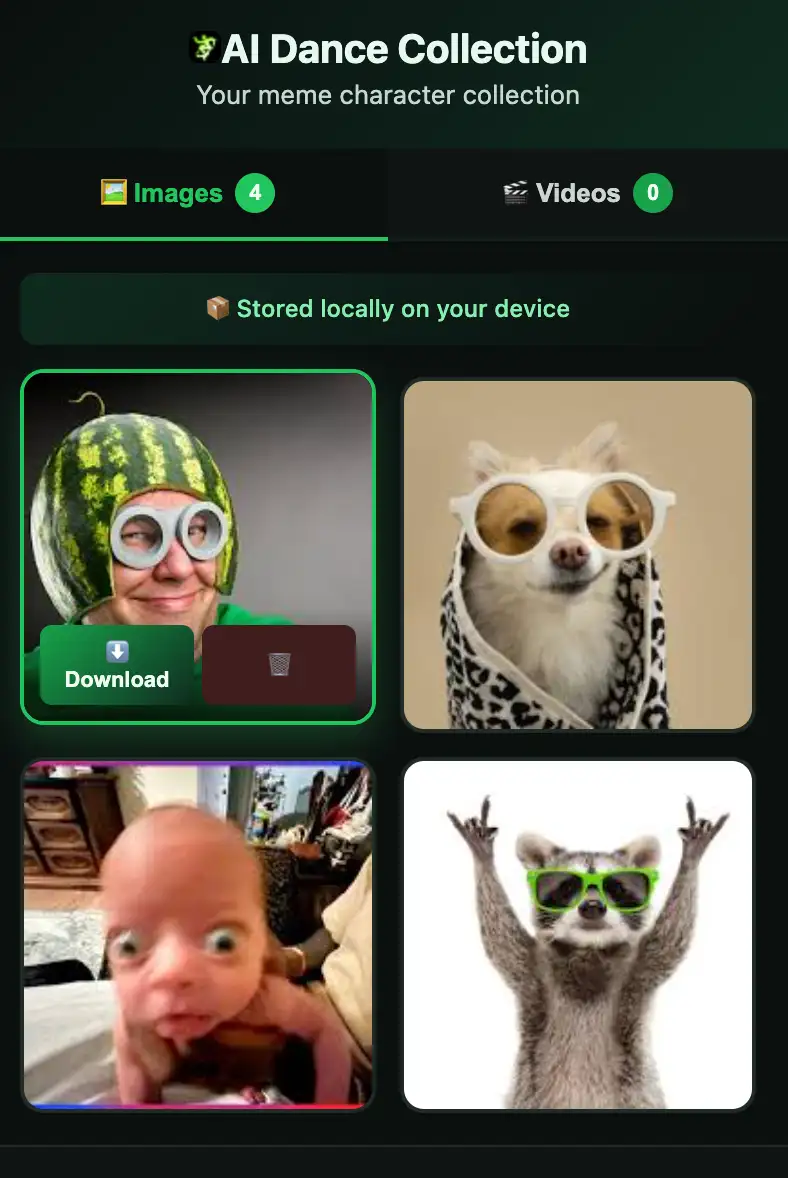
Right‑click a meme character image and save the link as inspiration. This does not download the file. It simply collects the source so you can decide later which character fits your next ai dance video. When ready, send the chosen image to AI Dance for cropping and upload to your Characters library.
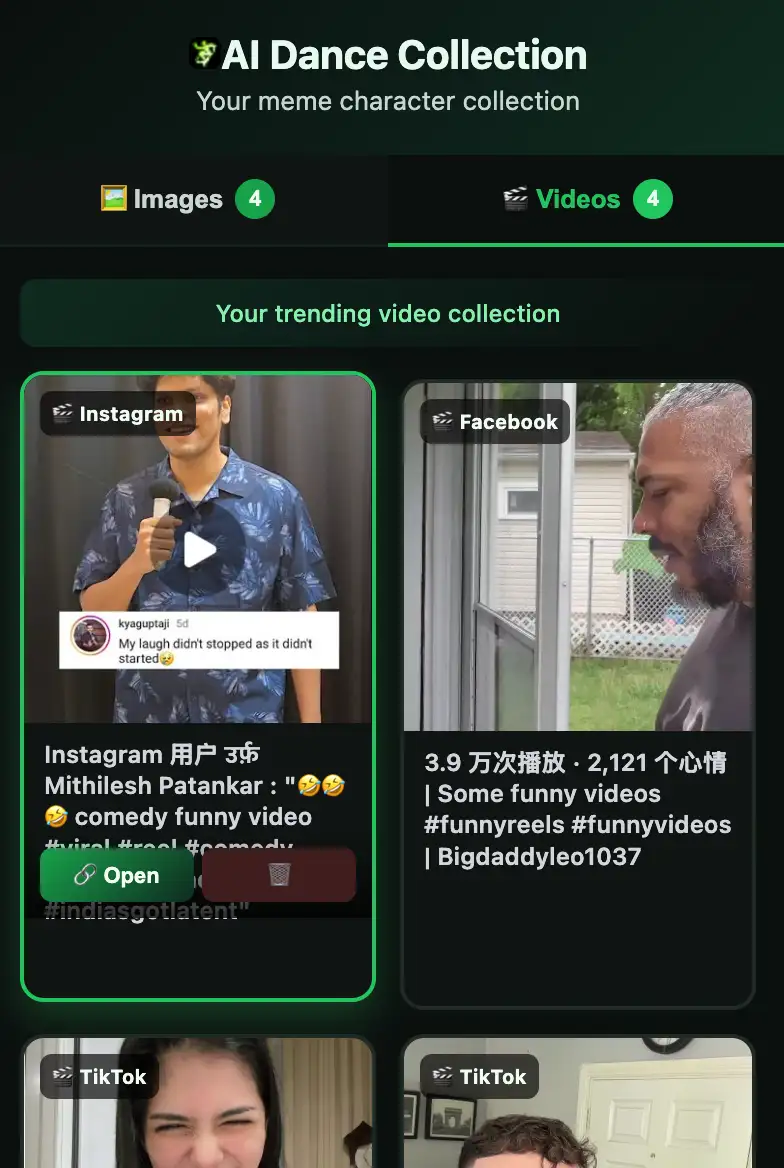
Right‑click a video and save the link to the extension. Use it as a motion reference when you are planning a new trending dance output. Later, open the saved link inside AI Dance to refresh timing, rhythm, and scene energy before you generate.
For TikTok creators building trending dance loops
If you build fast‑moving trending dance content for TikTok, you need an idea pipeline that matches the platform’s speed. The extension helps you grab the best references while you scroll: a specific move, a signature hand gesture, a background angle, or a meme reaction. Save it, move on, and keep your idea list full. When it is time to generate, you already have a shortlist of inputs for the AI Dance generator.
For YouTube creators exploring choreography and long‑form context
YouTube gives you deeper context—longer sequences, full routines, and multi‑camera edits. Use the extension to capture the strongest parts of a choreography, or save a video that shows how a scene transitions from intro to hook. This makes your ai dance video planning more intentional, especially when you want a result that feels complete rather than just a short loop.
For Instagram Reels and Facebook video remix cycles
Instagram and Facebook often surface trends after they appear on TikTok, but those trends can evolve with new aesthetics and community remixes. Use the extension to capture those variations so your AI dance creator workflow stays current. You can compare the same idea across platforms and decide which version to use as your reference point.
For meme character discovery and visual hooks
Sometimes the character is the trend. A meme face, a mascot, or an iconic character can turn a simple dance into a memorable moment. The extension helps you collect those characters as you browse, organize them by theme, and choose the one that best fits your ai dance video concept. This turns random discoveries into a reliable visual strategy for the AI Dance generator.
Why this matters for ai dance video creators
Creating a standout ai dance video is often about speed and precision. Trends move quickly, and creators who can capture inspiration early are the ones who post first. The extension supports that pace by letting you collect references from wherever you are already browsing. Then, when you return to AI Dance, you have a focused set of inputs instead of a mess of tabs.
It also improves quality. By separating inspiration collection from generation, you make better choices. You can compare character images, review motion references, and spot patterns in trending dance content. That leads to more consistent outputs, stronger visual hooks, and a higher chance your video lands on the For You page or the Shorts shelf.
Use cases for AI dance generator workflows
- Build a weekly board of trending dance references from TikTok and Instagram
- Collect meme character images that match a seasonal theme or a music trend
- Save YouTube choreography clips that align with your preferred motion style
- Capture Facebook video trends that are starting to cross into mainstream platforms
- Create a shortlist of concepts to test in the AI Dance generator
- Maintain a long‑term reference library so your AI dance tool workflow stays organized
Download link (Chrome Web Store)
Notes
- The extension does not download videos or files by default.
- Saved items are collected as links so you can curate before generating.
- You decide what to send to AI Dance and when to generate.